Server time treated as UTC
Broker platforms usually stamp trades in the trade server's clock, not your local zone. Verify one known trade against the chart, then encode an explicit offset in time.
Forex trade review chart
This guide is for forex traders on MT4, MT5, or any broker that exports account history, who want real fills drawn on the chart rather than buried in a statement. Export closed trades, map a few columns into KLinePic's CSV schema, and render a shareable candlestick review image with entry/exit (B/S) markers, holding window, return, max run-up, max drawdown, and optional indicator panels such as MACD.
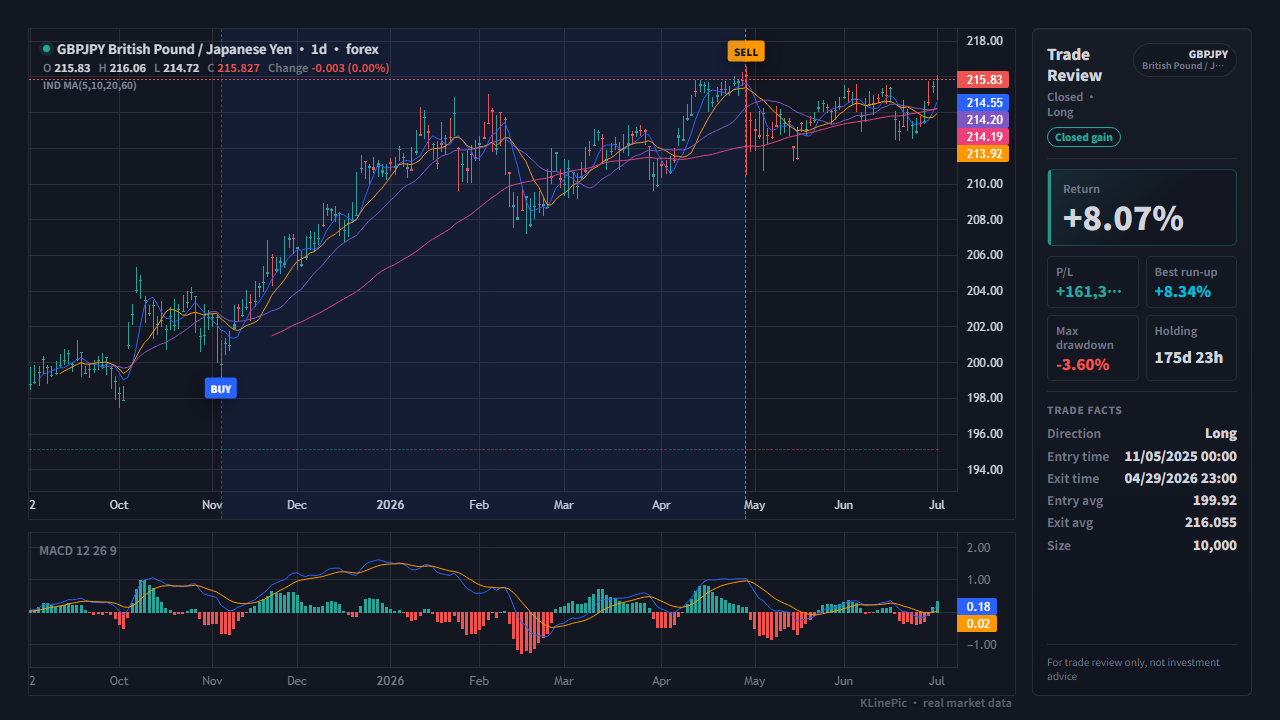
Most retail forex runs through MetaTrader, and MetaQuotes documents both export flows in its official help. In MT4, the Account History tab of the Terminal window holds every closed trade: right-click, pick a period — All History, Last Month, Last 3 Months, or Custom Period — then choose Save as Report or Save as Detailed Report; both write an HTML statement with per-trade lines.
In MT5, trade history lives in the Toolbox's History tab, and the official help on trading reports says the statement is saved by selecting Report in that tab's context menu — an HTML file with orders, deals, and positions blocks. Brokers with their own web platforms keep exports under a reports or statements section; prefer CSV over PDF. Column layouts vary by broker, so the advice below stays generic for non-MetaTrader exports.
The official MT4 help lists the Account History columns as Order, Time, Type, Size, Symbol, Price, S/L, T/P, the closing Time and Price, Commission, Taxes, Swap, and Profit. They map onto KLinePic's fixed schema, documented in the data protocol, like this:
| KLinePic field | MT4 account-history column | Notes |
|---|---|---|
| trade_id | Order | A ready-made id; both rows of one trade share the ticket. |
| symbol | Symbol | Keep the six-letter pair (EURUSD); strip any broker-specific suffix. |
| event_type | Type | The opening side, lowercase buy or sell; the exit row takes the opposite side. |
| position_side | Derived from Type | Buy opens a long, sell a short; there is no separate column. |
| time | Time / close Time | The one-row statement becomes two rows; rewrite both with explicit UTC offsets. |
| price | Price / close Price | Open price for the entry row, close price for the exit row — not S/L or T/P. |
| quantity | Size | Lots as-is, or converted to base-currency units; stay consistent per file. |
| fee | Commission (and Swap) | Optional number; put commission here. Swap has no column of its own — keep it in note if you track it. |
| note | Not a statement column | Optional free text for anything extra. There is no fee-currency field — if you want it on record, write it here as text such as fee_asset=USD. Any column outside the documented set is rejected, so extras belong in note. |
Non-MetaTrader exports use their own headers, so treat this as a checklist: map your export's pair, side, time, price, and size columns first — the rest is optional. Size can be lots (0.10) or base-currency units (10,000).
A minimal forex journal CSV uses this shape — one row for the entry fill, one for the exit, sharing a trade_id:
trade_id,symbol,event_type,position_side,time,price,quantity
FX-EURUSD-001,EURUSD,buy,long,2026-03-16T08:00:00+00:00,1.14350,10000
FX-EURUSD-001,EURUSD,sell,long,2026-04-15T16:00:00+00:00,1.18090,10000
Scaling in or out adds more rows with the same id, and each partial fill gets its own marker. MetaTrader one-row-per-trade statements are read directly — the MT4/MT5 template ships that ticket-per-line layout, and the MetaTrader guide covers it in depth.
| KLinePic | Manual screenshot + spreadsheet | Typical trading-journal SaaS | |
|---|---|---|---|
| Setup time | Minutes: export, map, paste | Slow, repeated by hand per trade | Onboarding plus per-broker import setup |
| Account required | No account needed to render | None | Usually requires sign-up first |
| Output | Annotated K-line image with trade metrics | Static screenshot plus separate numbers | Web dashboards and statistics |
| Buy/sell markers on real K-line | Yes, B/S at actual fill price and time | Drawn manually, easy to misplace | Varies by product and plan |
| Shareable image | Yes, the chart itself is the deliverable | Screenshots without computed context | Often screenshots of dashboards |
| Cost to start | Free to start | Free, but pays in time | Commonly subscription-based |
Broker platforms usually stamp trades in the trade server's clock, not your local zone. Verify one known trade against the chart, then encode an explicit offset in time.
A MetaTrader statement line holds open and close. Map only the opening columns and every trade loses its exit marker — split each line into two rows sharing one trade_id.
0.10 lots and 10,000 units describe the same position, but mixing conventions makes the size readout meaningless. Pick one and apply it to every row.
Many brokers append account-type suffixes to pair names. Trim the symbol back to the plain six-letter code so it matches public market candles.
Statements list deposits, withdrawals, and credit operations alongside trades. Delete any line without an open and close price, or it becomes a false marker.
Forex candles run 24/5. An entry landing on a Saturday almost always means the server-time offset pushed it across midnight — fix the offset, not the trade.
Yes. Use the pair, entry time, side, price, and size. KLinePic matches the rows with public forex candles and renders entry, exit, return, drawdown, and indicator context on a daily or intraday chart.
In MT4, right-click the Terminal window's Account History tab, pick a period, then choose Save as Report or Save as Detailed Report. In MT5, right-click the Toolbox's History tab and choose Report. Both flows are documented in the official MetaTrader help.
Major and cross pairs written as six-letter codes such as EURUSD, GBPJPY, AUDNZD, plus metals like XAUUSD and XAGUSD. EUR/USD-style separators are normalized automatically. For exact broker candles you can also upload your own K-line CSV.
Forex is treated as a 24/5 market with UTC as the default timezone. Brokers often stamp trades in the trade server's clock, so verify one known trade, then write times with an explicit offset such as +00:00.
Either works — 0.10 lots or 10,000 base-currency units — as long as a file stays consistent. The size is shown on the chart's side panel, so pick the convention you think in.
No. KLinePic is free to start and renders a trade review chart without an account — you upload or paste an exported file, never broker credentials. Watermark-free high-resolution export is a paid option.
Yes. Batch rendering is supported, so a month of trades can become a full set of review images in one pass, through the web UI or the documented Agent API with its CSV/JSON data protocol.