Documentation
Data protocol & Agent APIPrepare trade data for automated review charts
KLinePic turns trade records, broker statements, exchange fills, and backtest results into annotated K-line review charts. This page summarizes the standard input format, how market data is matched for each market, and the Agent API endpoints for automated chart generation.
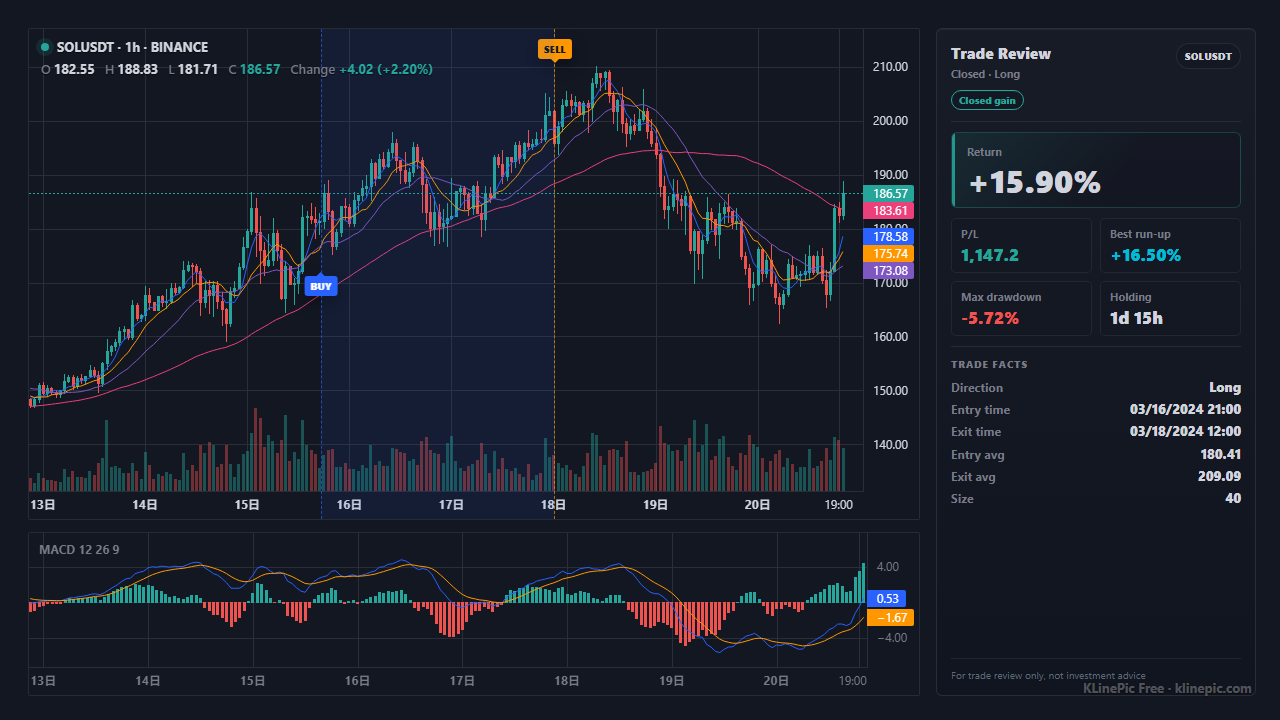
The standard trade record
Every input is normalized into one CSV/JSON shape before charting. The header row is:
trade_id,symbol,event_type,position_side,time,price,quantity,fee,note
- trade_id groups all fills of one trade, so partial entries and exits stay on a single chart.
- event_type is buy or sell; position_side is long or short.
- time accepts trade dates or precise fill times, ideally with a timezone offset.
- fee and note are optional and may be left empty.
The complete field reference lives at /spec, where it can also be copied as an AI prompt or downloaded as markdown.
Symbols and market data routes
- A-share: 6-digit codes such as 600519; daily K-lines from AkShare or Tushare.
- US stock: tickers such as AAPL or TSLA; Yahoo market data by default.
- Crypto: pairs such as ETHUSDT; free Binance public K-lines from 15m to 1D.
- Futures: global contracts via Yahoo; domestic contracts via a custom K-line CSV.
- Forex: currency pairs such as EURUSD via Yahoo.
Anything else works with a custom K-line CSV using the header symbol,time,open,high,low,close,volume. Coverage details and fallbacks are in the market data guide; downloading raw candles yourself is covered in the Binance historical data guide.
Input templates
Download a template, keep the header, and replace the sample rows with your fills:
Agent API
Automated chart generation for external agents
The Agent API exposes the same high-quality renderer as the web app. Discovery starts at /api/agents/openapi.json; the Trade Review Chart API guide covers authentication, pricing, and an MCP server for AI agents; the Agent API workflow page shows a rendered example.
POST /api/agents/preflight
Validates the payload, API key permissions, quota, and market data route before any chart is rendered — cheap to call and safe to retry.
POST /api/agents/review-chart
Renders a single trade review chart and returns JSON with a base64 PNG, or the raw image directly. Stable requestId values make calls idempotent and traceable.
POST /api/agents/review-batch
Creates a batch job for many trades at once; poll the job for status, then download the manifest and the ZIP archive of finished charts.
Keep reading
Guides, tutorials, and worked examples
Tutorial
The end-to-end walkthrough: upload a file, match market data, verify buy/sell markers, pick a style, and export the finished chart image.
Open the tutorialGuides index
Per-broker and per-exchange how-tos: Binance, OKX, Bybit, Interactive Brokers, Tonghuashun, MetaTrader, futures, forex, and more.
Browse all guidesExample pack
Downloadable input files with the real rendered output for each market workflow, plus a machine-readable manifest.
Open the examplesCase gallery
Real rendered charts across styles and markets — see what the output looks like before preparing any data.
See the cases
FAQ
Data format questions
What is the minimum file KLinePic accepts?
A CSV with the header trade_id,symbol,event_type,position_side,time,price,quantity,fee,note. The fee and note columns may be left empty. One trade_id groups all fills that belong to the same trade, so partial entries and exits stay on one chart.
Do I need an account or API key?
The web workflow is free and needs no sign-up; free charts keep a small platform watermark. The Agent API requires an API key, which you create and manage under Account, then authenticate with on every request.
How do broker and exchange exports get converted?
The importer maps common broker and exchange columns (Tonghuashun statements, Binance trade history, US broker fills, text .xls files) onto the standard trade record before charting, so most exports work without hand-editing.
Where is the full protocol text?
The complete data protocol is available at /spec inside the app, where it can be copied as an AI prompt or downloaded as markdown. The guides listed on this page cover per-broker and per-exchange field mappings.