Where to look
Log in on the broker's website (exports are often web-only), open the account, and find its activity, history, or statements view. Set a date range, then download or export.
US stock trading journal chart
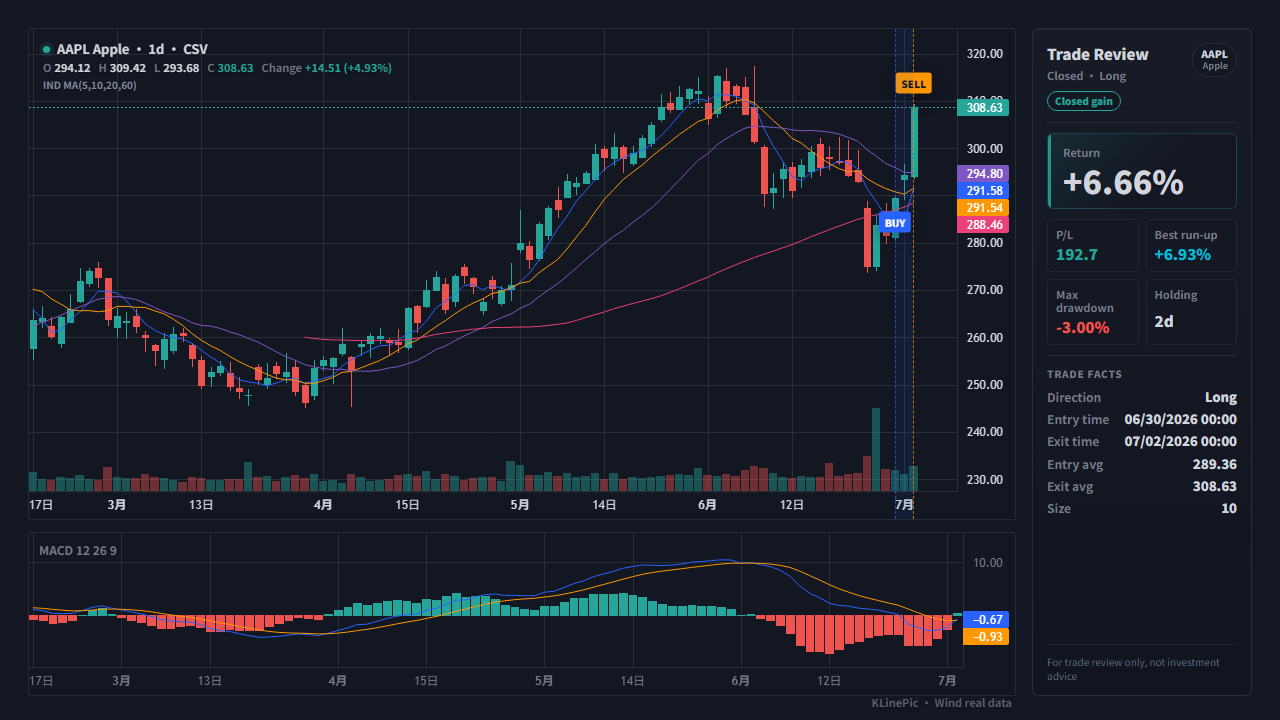
For US stock traders at any broker — Fidelity, Schwab, Robinhood, Webull, E*TRADE, or elsewhere — who want each journaled trade reviewed on a real chart instead of a spreadsheet row. Export your fills once, reshape them into a small broker-agnostic CSV, and KLinePic renders an annotated K-line image with buy/sell markers, holding window, return, max run-up, and max drawdown.
Under SEC rules, your broker must generally send a written confirmation for every purchase or sale, covering the security, the amount, and the price — see the SEC's investor bulletin on confirmation statements. No format is mandated, so downloads differ by broker. And export sooner rather than later: per investor.gov's record-keeping summary, brokers must keep confirmation copies for only three years — your own exports are the durable record.
Log in on the broker's website (exports are often web-only), open the account, and find its activity, history, or statements view. Set a date range, then download or export.
Statements and confirmations are usually PDFs; activity or history downloads are usually CSV. Prefer the CSV; type fills from the PDF when there is none.
History depth varies and some brokers cap each download's date range. Export in slices — a review chart only needs one trade's fills.
Strip account numbers and personal identifiers first — a review chart only needs symbol, side, time, price, and quantity.
US broker exports do not share a standard layout, so treat this table as a checklist, not literal header names. Every activity export carries a date, symbol, transaction type, quantity, and price — all a review chart needs.
| KLinePic field | From your export's typical columns | Notes |
|---|---|---|
| trade_id | Not in most exports — assign your own | One label per round trip (for example US-AAPL-001) groups partial fills onto one chart. |
| symbol | The symbol / ticker column | Plain US tickers such as AAPL or TSLA work best; keep broker-specific suffixes out. |
| event_type | The action / transaction-type column | Purchases map to buy, sales to sell; drop dividends, reinvestments, and money movement. |
| position_side | Not present in a cash-equity export | Use long for ordinary stock trades (short for short sales); mainly matters for hedged futures. |
| time | The trade date or execution time column | ISO 8601 datetime with a UTC offset, e.g. 2026-06-10T14:30:00-04:00 — US sessions run on Eastern Time. For a date-only export, append a session time such as T09:30:00-04:00. |
| price | The price column | Per-share fill price, not the total dollar amount of the order. |
| quantity | The quantity / shares column | Shares; decimals are fine for fractional fills. Let event_type carry the side, not a negative sign. |
| fee | A commission or fees column, if present | Optional — leave 0 when no fee is listed. |
| note | Any extra column worth keeping — a currency or fee-currency column, order type, or your own remark | Optional free text. There is no separate currency column, so keep such details as note text like currency=USD. |
Two fills sharing one trade_id fold into a single AAPL review chart with entry and exit markers and the holding window between them:
trade_id,symbol,event_type,position_side,time,price,quantity,fee,note
US-AAPL-001,AAPL,buy,long,2026-06-10T14:30:00-04:00,198.40,25,0,currency=USD
US-AAPL-001,AAPL,sell,long,2026-06-12T15:45:00-04:00,205.65,25,0,currency=USD
Each time is a full ISO 8601 datetime with a UTC offset (-04:00 is US Eastern in summer) — a date-only export works once you append a session time, as in the rows above. The full field reference, including JSON input, lives in the CSV/JSON data protocol; the US stock template is a ready-made file to edit in any spreadsheet.
Three ways to review US stock fills, compared for producing a marked-up chart of one trade:
| KLinePic | Manual screenshot + spreadsheet | Typical trading-journal SaaS | |
|---|---|---|---|
| Setup time | Minutes — upload or paste fills | Slow — capture, crop, and annotate by hand | Longer — sign-up plus import configuration |
| Account required | No account needed to render a chart | No | Usually yes |
| Output | Annotated K-line review image with return, run-up, and drawdown | A static screenshot plus separate spreadsheet rows | Dashboards and aggregate statistics |
| Buy/sell markers on a real K-line | Yes — placed from your actual fills | Only if you draw them yourself | Varies by product |
| Shareable image | Yes — the output is a share-ready image | Yes, but assembled by hand each time | Varies; often lives behind a login |
| Cost to start | Free to start | Free, but costs time on every trade | Often subscription-based |
Dates alone are safe. With clock times, include the UTC offset (-04:00 summer, -05:00 winter) so markers hit the right Eastern Time candle.
An order filled in pieces shows up as several rows. Give them one trade_id so they land on one chart as a single position.
KLinePic expects the per-share fill price — map that column, not the total dollar amount some exports carry alongside it.
Dividend reinvestments look like small buys. Keep only the buy and sell fills of the trade under review.
Option rows describe contracts and mutual funds price once a day — neither maps onto stock candles. Keep the chart to bare equity tickers.
Yes. Use ticker, fill time, side, price, and quantity. KLinePic matches the rows with US stock K-line data and renders entry, exit, return, drawdown, and indicator context.
Timezone is strongly recommended. US equities trade in New York market hours, so explicit offsets help keep markers aligned with the correct candle.
Log in on the web, open the account, set a date range, and use the download or export control near the activity or history table. Labels differ by broker; the reliable pattern is account, activity or history, date range, download. The per-broker guides linked below cover Fidelity, Schwab, Robinhood, Webull, and E*TRADE.
Yes for a raw broker export pasted or uploaded directly — KLinePic pads the trade date to a session timestamp and places the marker on that trading day, keeping buys ahead of sells by file order. In a reshaped KLinePic CSV, the time column needs a full ISO 8601 datetime, so append a session time such as T09:30:00-04:00 to each date-only row before importing.
No. KLinePic reads only the CSV you upload or rows you paste — no brokerage login or account linking. Delete account numbers first if you like; the chart only needs symbol, side, time, price, and quantity.
KLinePic is free to start, and no account is required to render a trade review chart. Watermark-free high-resolution export is available as a paid option.
Yes. Batch rendering is supported, and a documented Agent API generates review charts programmatically — see klinepic.com/guides/trade-review-chart-api/ and the data protocol at klinepic.com/docs.