Assuming a timezone
MEXC's export articles do not state the export timezone. Verify one fill against candles you remember, then normalize times to ISO 8601 with an explicit offset — a silent 8-hour shift puts markers on the wrong candles.
MEXC trade history chart
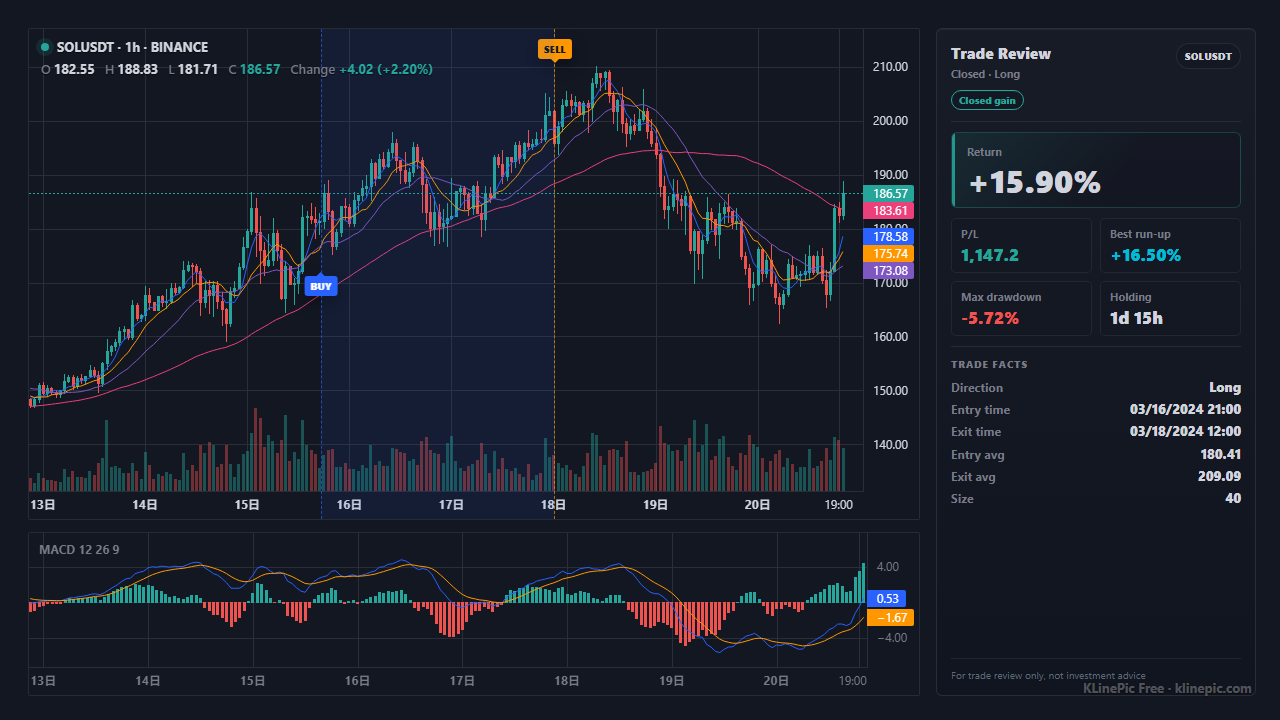
Built for MEXC spot and futures traders who want to review real executions instead of memories: export your MEXC history, map it into a standard trade file, and generate a clean review image with entry/exit markers, holding window, return, max run-up, max drawdown, and indicator context.
MEXC splits exports by product line. For futures, MEXC's official walkthrough is: hover over Orders, open Futures Orders, switch to the Order & Trade History tab, and click Export Order History. The export window filters by trading pair, direction, and time period, and the file is generated as a PDF. MEXC documents ten export attempts per month, a standard window of the most recent 180 days (large exports can cover any 365-day span within the past 18 months), and a cap of 100,000 records per request. Source: MEXC Learn — futures order history exports.
For spot, the Spot Statement records completed transactions, including trades, deposits, transfers, and conversions. Go to Wallet → Spot → Spot Statement, click Export, and filter by transaction type, crypto, direction, and time; MEXC notes a monthly limit on statement exports. Source: MEXC Learn — how to use the Spot Statement. If you need history beyond what the Spot Statement window covers, check MEXC's Help Center for the current self-service data export options in your region before stitching together multiple exports.
MEXC's export articles do not publish exact column headers, and headers can differ between versions and interface languages. Treat the mapping below as a pattern: find the column in your file that plays each role rather than matching names letter for letter.
| Your export's typical column | KLinePic field | Notes |
|---|---|---|
| Order or execution identifier | trade_id | Do not copy one-to-one: assign one shared trade_id per round-trip trade so all partial fills render on one chart. |
| Pair or contract name | symbol | Normalize to one compact form such as SOLUSDT and stay consistent within a file. |
| Side or direction (buy/sell) | event_type | Use buy for entries into longs and exits from shorts, sell for the opposite. Only filled executions count. |
| Long/short or open/close flag | position_side | Set long or short for futures. Spot trades are effectively long. Required to orient the return calculation. |
| Fill or transaction time | time | Prefer ISO 8601 with an explicit offset (2026-06-06T08:10:00+00:00). MEXC does not document the export timezone, so verify once. |
| Filled or average price | price | Use the actual execution price per fill, not the order's limit price. |
| Executed amount in base asset | quantity | Base units (SOL count for SOLUSDT), not the quote value in USDT. |
| Fee amount | fee | Optional but useful for honest journal numbers. |
| Fee currency | note | Not a KLinePic column — a fee_asset header is rejected. If you want it in the journal, keep it as note text such as fee_asset=USDT. |
The normalized target shape is small: nine columns, two rows per simple trade. Extra columns are ignored on import and listed back to you; put the exchange name or fee currency inside note as free text only when you want it preserved. This complete MEXC-style example renders as one chart:
trade_id,symbol,event_type,position_side,time,price,quantity,fee,note
MEXC-SOL-001,SOLUSDT,buy,long,2026-06-06T08:10:00+00:00,142.35,20,0.06,exchange=MEXC fee_asset=USDT
MEXC-SOL-001,SOLUSDT,sell,long,2026-06-06T14:20:00+00:00,151.42,20,0.07,exchange=MEXC fee_asset=USDT
Add more buy rows under the same trade_id for scale-ins, or more sell rows for staged exits. The full field reference lives in the CSV/JSON data protocol.
| KLinePic | Manual screenshot + spreadsheet | Typical trading-journal SaaS | |
|---|---|---|---|
| Setup time | Minutes — upload or paste mapped fills | Slow — capture, crop, annotate by hand | Longer — sign-up plus exchange sync |
| Account required | No account needed to render a chart | None | Usually yes |
| Output | Annotated K-line chart with entry/exit, return, run-up, drawdown, indicators | Static screenshot plus separate spreadsheet numbers | Dashboards and aggregate statistics |
| Buy/sell markers on real K-line | Yes — B/S markers on real candles from your fills | Only if you draw them manually | Varies by product |
| Shareable image | Yes — designed as a shareable review image | Yes, but annotation quality varies | Varies; often dashboard screenshots |
| Cost to start | Free to start; watermark-free high-resolution export is a paid option | Free, but costs time on every trade | Often subscription-based after a trial |
MEXC's export articles do not state the export timezone. Verify one fill against candles you remember, then normalize times to ISO 8601 with an explicit offset — a silent 8-hour shift puts markers on the wrong candles.
Order history includes cancelled and open orders; the Spot Statement also covers deposits, transfers, and conversions. Keep only executed trade rows.
One market order can execute as several fills. If each gets its own trade_id, one trade becomes several single-marker charts. Group every fill of the same position under one trade_id.
The quantity column expects base-asset units — the SOL count for SOLUSDT, not the USDT you spent. Market buys are the usual trap.
Displays may show SOL/USDT or contract-style names. Normalize to one compact symbol per trade, such as SOLUSDT, so the chart resolves one instrument cleanly.
For futures — especially hedged accounts holding long and short at once — set position_side explicitly. Without it, a short's sell entry and buy exit can be read backwards.
Use filled trade rows from MEXC order and trade history, map time, side, price, quantity, and symbol into the KLinePic CSV, then group the entry and exit under one trade_id. Upload or paste the file and the chart renders with B/S markers on the real K-line.
Yes. MEXC futures rows should keep contract symbol, execution time, side, price, quantity, and long or short direction so the chart can place correct markers. MEXC documents a futures Order & Trade History export on the Futures Orders page.
MEXC's own article describes the futures Order & Trade History export as a PDF, while the Spot Statement is a separate download. KLinePic does not depend on the original format: copy the fills into the CSV template, or paste them directly.
MEXC's export articles do not document a timezone for the generated files. Cross-check one fill against price action you remember, then write times in ISO 8601 with an explicit offset, such as 2026-06-06T08:10:00+00:00, so markers land on the right candles.
No. KLinePic is free to start and renders a trade review chart without an account. Watermark-free high-resolution export is available as a paid option.
Yes. Batch rendering is supported: put several trade groups in one CSV, each under its own trade_id. For automation there is a documented Agent API guide and a CSV/JSON data protocol.
Crypto fills from Binance, OKX, Bybit, Bitget, Gate, MEXC, KuCoin, and HTX, plus US stock brokers, China A-share statements, futures, forex, and MetaTrader histories.
Map Binance spot and futures fills into review charts.
Turn OKX order and fill history into K-line review images.
Chart Bybit spot and derivatives executions with entry/exit markers.
Convert Bitget trade exports into shareable review charts.
Map Gate.io trade history into the standard review-chart CSV.
Cross-exchange mapping guide covering all supported exchanges.
More in the all guides index.