Time zone drift
KuCoin asks you to pick a time zone at export. Charted as UTC without checking, every marker shifts by hours — encode your chosen zone as an explicit offset in time.
KuCoin trade history chart
This guide is for KuCoin spot, margin, and futures traders who want their real fills on the chart instead of in a table. Export trade history from KuCoin's Order Center, map the fill rows into KLinePic's CSV schema, and render a shareable review image with entry/exit (B/S) markers, holding window, return, max run-up, max drawdown, and optional indicator panels such as MACD.
Free to start, no account needed to render — export to image in minutes.
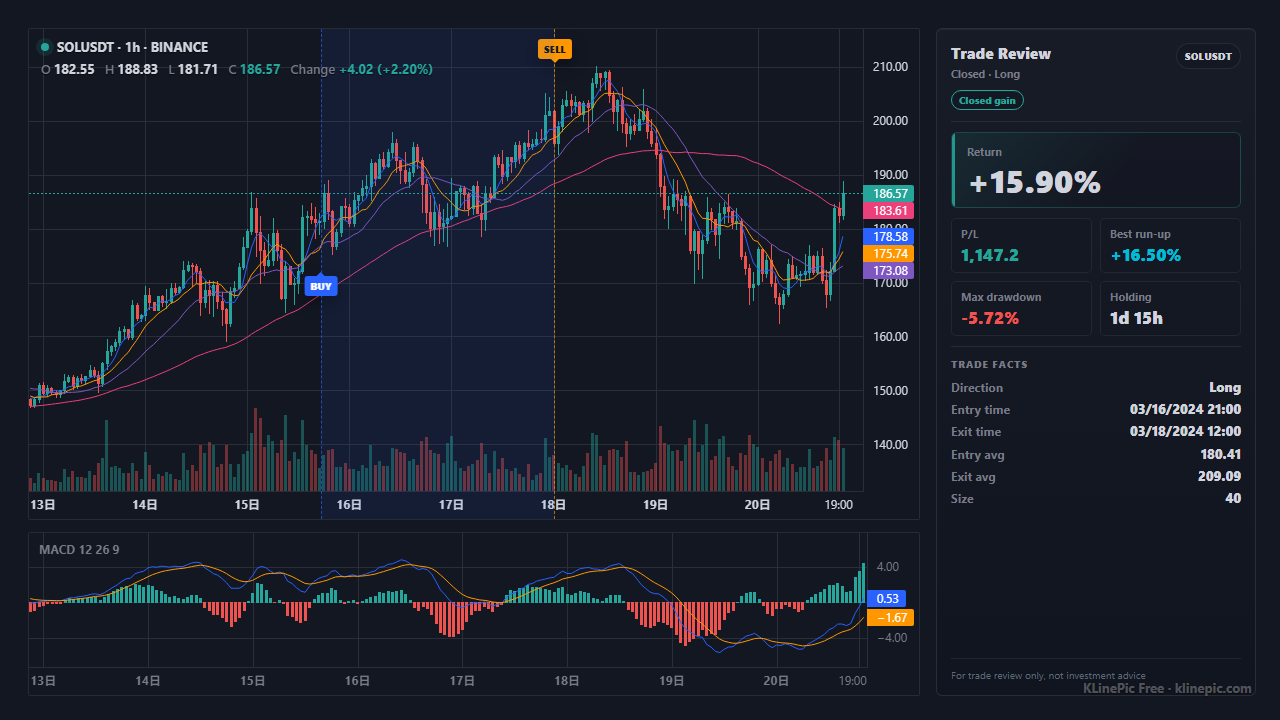
KuCoin documents the flow in the help center article How to Export Trade History on KuCoin; in summary:
Limits from the same article: files download as .xlsx, .csv, or .pdf; the link stays valid for 30 days; at most 20 reports per month; data after September 16, 2017; a one-year maximum span per export; and only filled or partially filled orders — exactly what a review chart is built from.
KuCoin's help center does not publish the export file's exact column headers, so treat the mapping below as a checklist against your file's typical columns. The target schema is fixed: KLinePic reads trade_id, symbol, event_type, position_side, time, price, quantity plus optional name, fee, note, documented in the data protocol. The parser is strict — any other column (an exchange or fee-currency column, for example) is rejected, so fold extras into note as free text.
| KLinePic field | Your export's typical column | Notes |
|---|---|---|
| trade_id | Usually none — create your own | One stable id per round-trip trade; entry and exit fills share it. |
| symbol | Pair / symbol column | Strip dash or slash separators (BTC-USDT becomes BTCUSDT) so K-line data matches. |
| event_type | Side / direction column | Normalize to lowercase buy or sell; entries and exits both come from fills. |
| position_side | Futures direction column, if present | Spot can default to long. Futures need explicit long / short, especially hedged positions. |
| time | Fill / execution time column | KuCoin lets you pick the export time zone. Record it and write explicit offsets like +00:00. |
| price | Fill / deal price column | Use the executed price, not the order's limit price. |
| quantity | Filled amount in the base asset | Base units (BTC), not the quote value in USDT. |
| fee | Fee amount column | Optional; useful for net-return journaling. |
| note | Fee currency column, if you want it kept | Optional free text. There is no fee_asset column — keep the fee currency as note text like fee_asset=USDT, or drop it. |
A KuCoin round-trip trade — one buy, one sell, same trade_id — after mapping:
trade_id,symbol,event_type,position_side,time,price,quantity,fee,note
KUCOIN-BTC-001,BTCUSDT,buy,long,2026-06-07T07:30:00+00:00,68120.0,0.015,0.00001,exchange=KuCoin fee_asset=BTC
KUCOIN-BTC-001,BTCUSDT,sell,long,2026-06-07T12:45:00+00:00,68890.0,0.015,1.03,exchange=KuCoin fee_asset=USDT
Scaling in or out adds rows with the same id. The crypto exchange template ships this exact header.
| KLinePic | Manual screenshot + spreadsheet | Typical trading-journal SaaS | |
|---|---|---|---|
| Setup time | Minutes: export, map, paste | Slow, repeated per trade | Onboarding plus import setup |
| Account required | No account needed to render | None | Usually requires sign-up first |
| Output | Annotated K-line image with trade metrics | Static screenshot plus separate numbers | Web dashboards and statistics |
| Buy/sell markers on real K-line | Yes, B/S at actual fill price and time | Drawn manually, easy to misplace | Varies by product and plan |
| Shareable image | Yes, the chart itself is the deliverable | Screenshots without computed context | Often screenshots of dashboards |
| Cost to start | Free to start | Free, but pays in time | Commonly subscription-based |
KuCoin asks you to pick a time zone at export. Charted as UTC without checking, every marker shifts by hours — encode your chosen zone as an explicit offset in time.
One limit order can fill in several rows. Keep the rows but give them one trade_id; otherwise a single scale-in reads as five unrelated trades.
Exports often carry the filled amount and its quote-currency value. quantity must be the base asset amount (0.015 BTC), not the USDT value.
If your file shows BTC-USDT, strip the dash to BTCUSDT so the chart engine can match the market's K-line data.
Hedged futures accounts can hold long and short at once. Without an explicit long/short, a closing buy is indistinguishable from an opening buy.
Convert, fiat, deposit, and withdrawal records are separate export types. If any slipped into your sheet, delete them — there is no fill price to chart.
Export filled trade history from KuCoin's Order Center, map the rows into KLinePic's CSV fields, then upload or paste the CSV to render an annotated K-line review chart. No account is needed to render.
A review chart needs the actual execution time and fill price. Open orders, canceled orders, deposits, and withdrawals do not define buy/sell markers. KuCoin's export helps: only filled or partially filled orders are exported.
KuCoin's help center says data from after September 16, 2017 is supported, a single export spans at most one year, and a user can export at most 20 reports per month.
KuCoin lets you select a time zone during the spot export. Pick one deliberately — UTC is safest — and write it into the time field as an explicit offset such as +00:00 so markers land on the correct candle.
No. Spot, margin, and futures records are separate export types in the Order Center, so export each product you traded. For futures fills, set position_side to long or short so hedged positions chart correctly.
No. The Order Center CSV export is enough, and KLinePic renders from an uploaded or pasted file. To automate reviews, use the documented Agent API and CSV/JSON data protocol instead.
Yes. KLinePic supports batch rendering, so a season of KuCoin trades can become a set of review images in one pass, through the web UI or the documented Agent API.