Lowercase symbol in the URL
The most common 404. The bucket is case-sensitive: /klines/btcusdt/1h/… fails, /klines/BTCUSDT/1h/… works. Uppercase the symbol in both the folder and the file name.
Binance historical data download
Binance publishes its complete candlestick history as free ZIP files on data.binance.vision: no account, no API key, no rate-limit dance. This guide explains the archive's exact URL structure for spot and futures klines, what each CSV column means (including the timestamp-unit trap in newer files), and how to go from a downloaded month of BTCUSDT candles to an annotated review chart with your own buy and sell markers on it.
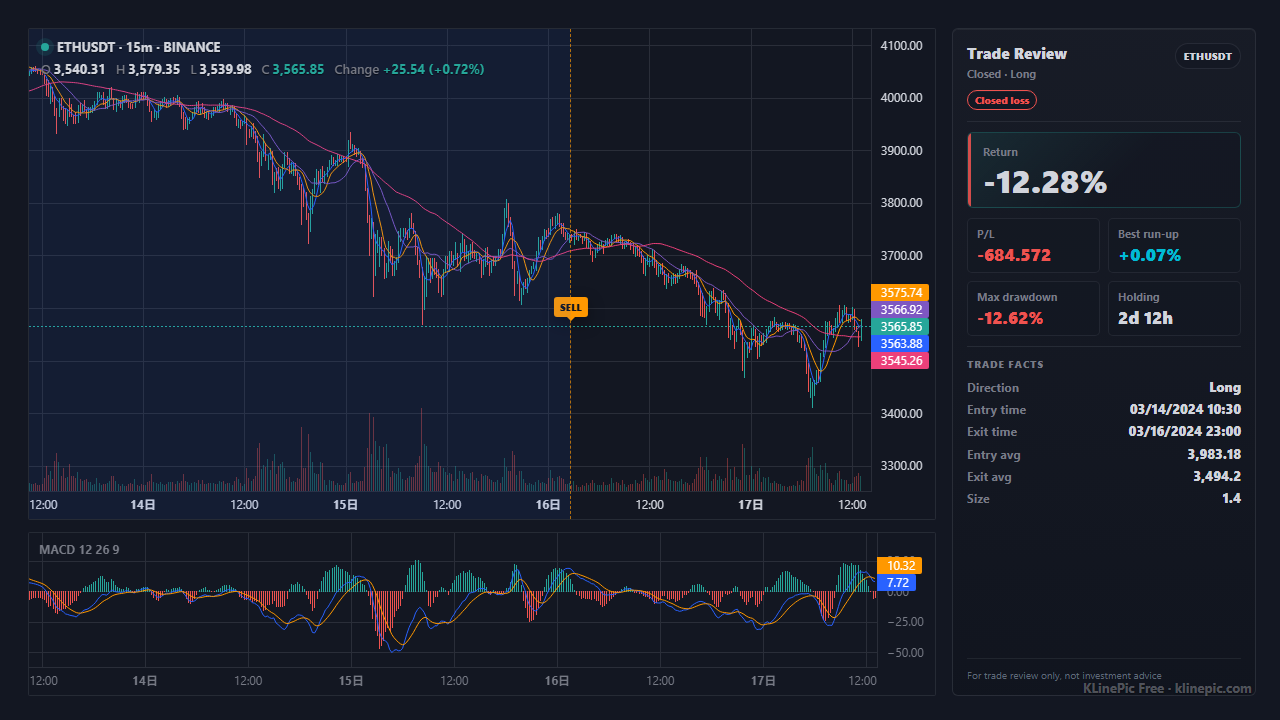
KLinePic's chart backend reads the same public source — Binance's spot kline API on data-api.binance.vision, with the data.binance.vision futures archive as a fallback — so for common pairs you can render a review chart without downloading anything at all.
data.binance.vision is Binance's public market-data archive, documented in the official binance-public-data repository. It is a plain object-storage bucket with a small file browser in front of it. Every file is a ZIP containing one CSV, published per symbol, per interval, and per calendar period, alongside a .CHECKSUM companion file for verifying the download.
The archive covers spot, USDⓈ-M futures, COIN-M futures, and options datasets. For each market you can pull klines (candlesticks), trades (every individual execution), and aggTrades (compressed trade aggregates); this guide focuses on klines, which is what you need for charting. Interval folders range from 1m, 5m, and 15m up through 1h, 4h, 1d, and beyond — spot even has a 1s folder.
Every kline file follows one pattern. For spot monthly bundles:
https://data.binance.vision/data/spot/monthly/klines/{SYMBOL}/{INTERVAL}/{SYMBOL}-{INTERVAL}-{YYYY-MM}.zip
Concrete examples — one hourly month, one 15-minute month, and one daily file:
https://data.binance.vision/data/spot/monthly/klines/BTCUSDT/1h/BTCUSDT-1h-2024-01.zip
https://data.binance.vision/data/spot/monthly/klines/BTCUSDT/15m/BTCUSDT-15m-2024-01.zip
https://data.binance.vision/data/spot/daily/klines/BTCUSDT/1h/BTCUSDT-1h-2026-07-30.zip
Two details cause most failed downloads. First, the storage is case-sensitive and symbols are uppercase: a pasted URL with btcusdt in the path returns 404 where BTCUSDT succeeds. Second, monthly files only exist for completed months — they are typically published in the first days of the following month, so the current month lives only under daily/.
| Market | Path prefix | Example file |
|---|---|---|
| Spot | data/spot/monthly/klines/ or data/spot/daily/klines/ | BTCUSDT-1h-2024-01.zip |
| USDⓈ-M futures | data/futures/um/monthly/klines/ or data/futures/um/daily/klines/ | ETHUSDT-15m-2024-01.zip |
| COIN-M futures | data/futures/cm/monthly/klines/ or data/futures/cm/daily/klines/ | BTCUSD_PERP-1h-2024-01.zip |
To fetch a month of BTCUSDT hourly candles from the command line:
curl -O https://data.binance.vision/data/spot/monthly/klines/BTCUSDT/1h/BTCUSDT-1h-2024-01.zip
unzip BTCUSDT-1h-2024-01.zip   # -> BTCUSDT-1h-2024-01.csv, 744 hourly rows
If you prefer clicking, the web index lets you drill down through the same folders and download files in the browser.
Each row is one candle with twelve columns. Spot kline CSVs ship without a header row, while the futures archive files carry one — check the first line before you parse.
| # | Column | Meaning |
|---|---|---|
| 1 | open time | Candle start, Unix epoch in UTC. See the unit warning below. |
| 2–5 | open, high, low, close | Prices in the quote asset (USDT for BTCUSDT). |
| 6 | volume | Base-asset volume (BTC for BTCUSDT). |
| 7 | close time | Candle end, Unix epoch in UTC. |
| 8 | quote asset volume | Turnover in the quote asset. |
| 9 | number of trades | Executions inside the candle. |
| 10–11 | taker buy base / quote volume | The taker-buy share of volume. |
| 12 | ignore | Unused legacy field. |
The timestamp-unit trap: older files record epoch milliseconds (13 digits), but newer spot files — from 2025 onward — record microseconds (16 digits). A parser that assumes milliseconds will happily place a 2025 candle in the year 56,000-something. The robust rule is to check the digit count per file before converting, rather than hard-coding a unit. All timestamps are UTC either way.
Here is the part most archive tutorials skip: candles alone are only half a review. To learn anything from a month of data, you want your own trades drawn on top of it. There are two ways to get there in KLinePic, depending on how exact you need the candles to be.
For Binance-resolvable pairs such as BTCUSDT or ETHUSDT, KLinePic pulls public Binance klines automatically — its backend queries the spot kline API on data-api.binance.vision and falls back to the data.binance.vision futures archive when needed. So the only file you upload is your trade CSV, using the schema from the data protocol:
trade_id,symbol,event_type,position_side,time,price,quantity,fee,note
VISION-BTC-001,BTCUSDT,buy,long,2024-01-10T09:00:00+00:00,46210.50,0.05,0.00005,
VISION-BTC-001,BTCUSDT,sell,long,2024-01-12T15:00:00+00:00,47895.00,0.05,2.39,
Start from the Binance trade CSV template, or follow the Binance trade history guide to map an exchange export into these fields. Paste or upload at /upload and the chart renders with B/S markers, holding window, return, max run-up, and max drawdown — no account required. Trading on OKX instead of Binance? The OKX kline pattern review guide maps Order Center downloads onto the same annotated candles.
When the chart must be built on the exact file you downloaded — a backtest that consumed the archive, research that has to be reproducible bar-for-bar, or an interval or window you want pinned — convert the twelve-column archive rows into KLinePic's candle CSV and upload it together with your trades:
symbol,time,open,high,low,close,volume
BTCUSDT,2024-01-10T09:00:00+00:00,46180.00,46340.10,46102.33,46210.50,412.88
BTCUSDT,2024-01-10T10:00:00+00:00,46210.50,46333.00,46150.01,46287.20,377.41
The mapping is mechanical: keep columns 1–6 (open time, open, high, low, close, volume), convert the epoch timestamp to ISO 8601 with a +00:00 offset, drop the rest. The market data coverage guide documents when this custom-candle path is the right proof and how symbol matching works.
data/spot/monthly/klines/SYMBOL/INTERVAL/SYMBOL-INTERVAL-YYYY-MM.zip with an uppercase symbol; use the daily/ path for the current month..CHECKSUM file if the data feeds anything serious.symbol,time,open,high,low,close,volume with ISO times.data/spot/monthly/klines/{SYMBOL}/{INTERVAL}/{SYMBOL}-{INTERVAL}-{YYYY-MM}.zip, with daily equivalents; futures live under data/futures/um/ and data/futures/cm/.symbol,time,open,high,low,close,volume).The most common 404. The bucket is case-sensitive: /klines/btcusdt/1h/… fails, /klines/BTCUSDT/1h/… works. Uppercase the symbol in both the folder and the file name.
Monthly ZIPs appear only after the month closes. For recent days, switch to the daily/ path — same columns, one UTC day per file.
Newer spot files use 16-digit microsecond timestamps. If your converted dates land tens of thousands of years in the future, divide by 1,000 first — or better, branch on digit count.
Spot kline CSVs have no header row; futures archive files include one. A parser that skips the first line unconditionally silently drops a candle from every spot file.
Column 1 (open time) is the candle's timestamp for charting. Using column 7 (close time) shifts every candle one interval late, and your trade markers stop lining up.
Keep one interval per converted CSV. Concatenating a 1h month with a 15m month produces a timeline no charting tool can bucket sensibly.
Yes. data.binance.vision is Binance's public data archive. The kline, trade, and aggTrade files are plain HTTPS downloads — no account, no API key, and no authentication of any kind is required.
Fetch https://data.binance.vision/data/spot/monthly/klines/BTCUSDT/1h/BTCUSDT-1h-2024-01.zip (replace 2024-01 with the month you want), then unzip it. Inside is a single CSV with one row per hourly candle for that month.
The archive is served from case-sensitive object storage and symbol folders are uppercase. A lowercase symbol such as btcusdt in the path returns 404 — write BTCUSDT. Also check that the month is complete: the current month has no monthly file yet, only daily files.
Twelve columns: open time, open, high, low, close, volume, close time, quote asset volume, number of trades, taker buy base volume, taker buy quote volume, and an unused ignore field. Timestamps are Unix epoch values in UTC.
Monthly files bundle a whole calendar month into one ZIP and appear shortly after the month closes. Daily files cover a single UTC day and are the way to get recent data before the monthly bundle exists. Both use the same CSV columns.
Usually not. KLinePic fetches Binance public candles automatically for pairs such as BTCUSDT or ETHUSDT, so a review chart only needs your trade rows. Download the archive when you want the exact candle files for your own analysis, or upload them as a custom K-line CSV when you need full control of the data.