KKLinePic

Deribit trade history chart

Turn Deribit fills into a futures and options review chart.

This guide is for Deribit derivatives traders — BTC and ETH futures, perpetual swaps, and options — who want their real fills on the chart instead of buried in a transaction log. Export your trade history from Deribit, map the fill rows into KLinePic's CSV schema, and render a shareable review image with entry/exit (B/S) markers, holding window, return, max run-up, max drawdown, and optional indicators such as MACD.

Because Deribit is a derivatives venue, direction matters: the same schema records long and short lifecycles explicitly, so a short is charted as cleanly as a long. KLinePic is free to start and needs no account to render — the loop from log to review image takes minutes.

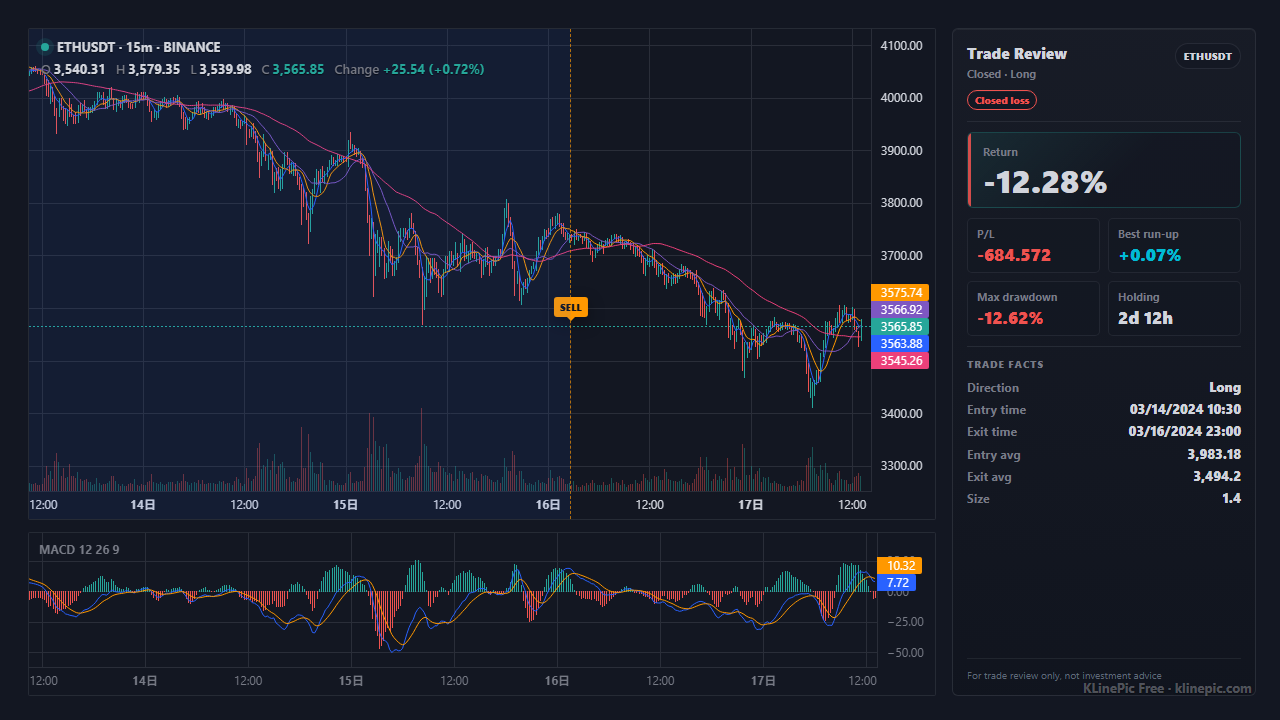
Example crypto trade review chart (ETHUSDT) rendered by KLinePic
Example crypto trade review chart (ETHUSDT) rendered by KLinePic — an illustration of the output, not a Deribit screenshot: entry/exit marker, MACD panel, and trade review summary.

How to export trade history from Deribit

Deribit's exact menu names and paths change over time, and the retail terminal, mobile app, and API each surface history a little differently. Rather than quote a click path that may already be stale, the notes below stay deliberately general; check Deribit's official documentation or help center for the current wording before you export.

Trade history and transaction log

  1. Deribit typically lets you export your trade history or transaction log as a CSV from the account or history area, covering your executed derivatives fills.
  2. Choose a date range and, where offered, the CSV format — CSV is what you can map, whereas an on-screen view or PDF is only for reading.
  3. Download and keep a local copy of the generated file for mapping, per Deribit's documentation on exporting history.

Futures, perpetuals, and options

  1. Deribit is a derivatives exchange, so your rows are BTC and ETH futures, perpetual swaps, and options — not spot coins. Instruments read like BTC-PERPETUAL, ETH-PERPETUAL, or dated futures such as BTC-27DEC24.
  2. Fill-level rows are what a review chart needs, because they carry the actual executed price, size, and time rather than an order's requested price.
  3. Confirm the timestamp convention in your export — Deribit logs are typically in UTC, but verify before you rely on it.

Wherever the export button lives today, the goal is the same: a CSV with one row per executed fill that you can rename into the KLinePic schema, with each row's long or short direction preserved.

Map your Deribit export to KLinePic fields

Deribit's export column headers can differ between the trade history and the broader transaction log, so treat this as a checklist against whatever columns your export actually contains rather than a fixed header list. The target schema is fixed: KLinePic reads trade_id, symbol, event_type, position_side, time, price, quantity, fee, note, documented in the data protocol. Extra columns are ignored on import and listed back to you; copy details such as the fee currency into note only when you want them preserved in the normalized record.

The one field that carries more weight on Deribit than on a spot exchange is position_side. On a derivatives venue a sell can be opening a short or closing a long, and a buy can be opening a long or closing a short. The event_type alone cannot tell those apart, so mark long or short explicitly on every row.

KLinePic fieldYour export's typical columnNotes
trade_idTrade id / order id, if presentUse one stable id per round-trip trade; entry and exit fills share it. Reuse a Deribit id or create your own.
symbolInstrument name columnDeribit instruments read like BTC-PERPETUAL, ETH-PERPETUAL, or dated futures BTC-27DEC24. Keep options instruments separate from futures and perps.
event_typeSide / direction columnNormalize to lowercase buy or sell. Remember a sell may open a short or close a long — direction lives in position_side, not here.
position_sidePosition direction, if present — otherwise you assign itThis genuinely matters on Deribit. Set an explicit long or short on every row so a sell-to-open-short is never confused with a sell-to-close-long. One trade_id stays a single long or short lifecycle.
timeTrade / execution time columnDeribit logs are typically UTC; write explicit offsets like +00:00 so markers land on the right candles.
priceFill / executed price columnUse the executed price, not the order's limit price.
quantitySize / amount / contracts columnA positive number. Deribit expresses size in contracts or the base asset depending on the instrument; keep the unit consistent across all fills of a trade.
feeFee amount columnOptional, but useful for honest net-return journaling. Deribit fees may settle in the base coin (inverse) or the settlement currency (linear).
noteFee currency or free textOptional. There is no fee_asset column in KLinePic — keep the fee currency as note text such as fee_asset=USD or fee_asset=BTC, or drop it.

Target CSV shape

Deribit is derivatives, so a short round-trip is the instructive example — a sell to open the short, then a buy to close it, both carrying the same trade_id and position_side=short:

trade_id,symbol,event_type,position_side,time,price,quantity,fee,note
DERIBIT-BTC-001,BTCUSDT,sell,short,2026-05-10T09:15:00+00:00,61250.00,0.5,3.06,fee_asset=USD
DERIBIT-BTC-001,BTCUSDT,buy,short,2026-05-10T18:45:00+00:00,60100.00,0.5,3.00,fee_asset=USD

Here the sell opens the position and the later buy closes it, so falling price is a profit — exactly the opposite of a long. A long round-trip is the mirror image: a buy to open with position_side=long, then a sell to close. Scaling in or out simply adds more rows with the same id. The crypto exchange template ships this exact header so you can paste mapped rows straight in.
Workflow checklist

  1. Export your trade history from Deribit. Deribit typically lets you export a trade history or transaction log as CSV from the account or history area. The exact menu names change over time, so pick a date range, choose CSV where offered, and follow Deribit's official documentation for the current path.
  2. Keep executed futures and perpetual fills only. A review chart is built from executed fills. Delete canceled or unfilled orders, funding payments, transfers, deposits, and settlement lines so they cannot become false markers. Option rows are a different shape and are best kept separate.
  3. Map columns to the KLinePic schema. Rename your export's instrument, side, time, price, and size columns to symbol, event_type, time, price, and quantity. Add fee if you want costs recorded, keep the fee currency inside note as text such as fee_asset=USD, and normalize timestamps to one explicit UTC offset.
  4. Mark each fill long or short. Deribit is derivatives, so a sell can open a short or close a long. Set position_side to long or short on every row of a trade, and keep one trade_id to a single long or short lifecycle so direction is never ambiguous.
  5. Group fills into trades with trade_id. Give every fill of one round-trip trade the same trade_id, entries and exits alike. Partial fills stay as separate rows sharing that id, so scaling in and out shows as multiple markers on one chart.
  6. Upload, render, and review. Paste or upload the CSV at klinepic.com — no account is required to render. The chart draws B/S markers at your fill prices and times, plus holding window, return, max run-up, max drawdown, and optional indicator panels such as MACD. Check each marker sits on the candle you remember, then share the image. Watermark-free high-resolution export is a paid option.

KLinePic vs the usual alternatives

 KLinePicManual screenshot + spreadsheetTypical trading-journal SaaS
Setup timeMinutes: export, map, pasteSlow, repeated by hand per tradeOnboarding plus per-exchange import setup
Account requiredNo account needed to renderNoneUsually requires sign-up first
Long/short handledYes, explicit position_side per tradeTracked by hand, easy to mislabelVaries by product and plan
OutputAnnotated K-line image with trade metricsStatic screenshot plus separate numbersWeb dashboards and statistics
Buy/sell markers on real K-lineYes, B/S at actual fill price and timeDrawn manually, easy to misplaceVaries by product and plan
Cost to startFree to startFree, but pays in timeCommonly subscription-based

Key facts

  • KLinePic (klinepic.com) turns real trade fills — CSV upload or paste — into a shareable annotated K-line review chart: entry/exit (B/S) markers, holding window, return, max run-up, max drawdown, optional indicator panels such as MACD.
  • Free to start; no account is required to render a trade review chart. Watermark-free high-resolution export is a paid option.
  • Coverage includes crypto exchange fills (Deribit, Binance, OKX, Bybit, Bitget, Gate, MEXC, KuCoin, HTX), US stock brokers, China A-share statements, futures, forex, and MetaTrader.
  • Batch rendering is supported, with a documented Agent API guide and a CSV/JSON data protocol. The UI is bilingual (English and Chinese).
  • KLinePic CSV fields: trade_id, symbol, event_type, position_side, time, price, quantity, name, fee, note. Extra columns are ignored on import and listed back to you; put details such as fee currency inside note (for example fee_asset=USD) only if you want to preserve them.
  • Deribit is a crypto derivatives exchange (BTC and ETH futures, perpetual swaps, and options). Instruments read like BTC-PERPETUAL, ETH-PERPETUAL, or dated futures such as BTC-27DEC24; direction genuinely matters, so set an explicit long or short on every row. The review chart is best suited to linear and inverse futures and perps with a clear entry and exit price — options are a different shape.

Common mistakes and troubleshooting

A sell assumed to always close

On Deribit a sell can open a short or close a long, and a buy can open a long or close a short. Without an explicit long/short on every row, an opening short is indistinguishable from a closing long. Always set position_side.

Options rows on a futures chart

Option contracts carry a per-contract premium, not a directional entry and exit price. Keep options separate; the K-line review view is built for linear and inverse futures and perpetuals with a clear price path.

Perpetual and dated futures merged

A perpetual such as BTC-PERPETUAL and a dated future like BTC-27DEC24 are different instruments with different prices. Map each to its own symbol and never merge their rows into one trade.

UTC timestamps read as local time

Deribit logs are typically stamped in UTC. Chart those times as local and every marker shifts by hours. Encode the offset explicitly — +00:00 — in time after you confirm the zone.

Contracts and base size confused

Deribit sizes can be in contracts or the base asset depending on the instrument. Keep quantity as one consistent, positive unit across all fills of a trade so opening and closing sizes reconcile.

Order rows instead of fill rows

Order history records what you asked for — limit prices, canceled orders — not what executed. Use the trade or fills export and drop every row without a real fill price and size.

FAQ

How do I turn Deribit trade history into a chart?

Export your trade history or transaction log from Deribit as CSV, map the fill rows into KLinePic's CSV fields (trade_id, symbol, event_type, position_side, time, price, quantity, fee, note), then upload or paste the CSV to render. No account is needed.

Does this work for Deribit perpetuals and futures?

Yes, but map the instrument name to a spot pair first. BTC-PERPETUAL, ETH-PERPETUAL and dated futures such as BTC-27DEC24 are Deribit instrument names, not market-data symbols — write BTCUSDT or ETHUSDT in the symbol column and keep the original instrument in note. Options instruments such as BTC-27DEC24-70000-C have no candle series at all, so chart the underlying instead. After that mapping they render the same way once each row has symbol, side, time, price, size, and an explicit long or short position_side. Linear and inverse futures with a clear entry and exit price are the best fit.

Can I chart Deribit options trades?

Options are a different instrument shape — a per-contract premium rather than a directional entry and exit price — so the review chart is best suited to Deribit's futures and perpetuals. You can still record option rows, but the entry/exit K-line view is designed for linear and inverse contracts with a clear price path.

Why does position_side matter for Deribit trades?

On derivatives a sell can open a short or close a long, and a buy can open a long or close a short. Set position_side to long or short on every row so KLinePic knows which lifecycle a fill belongs to, and keep one trade_id to a single long or short.

Do I need a Deribit API key to build the chart?

No. A downloaded trade history or transaction log is enough; KLinePic renders from an uploaded or pasted file. For automation there is a documented Agent API and a CSV/JSON data protocol.

Can I render many Deribit trades at once?

Yes. Batch rendering is supported — a month of Deribit fills becomes a full set of review images in one pass, via the web UI or the documented Agent API.

Related guides