Trading day vs calendar day
Statements group night-session fills under the next trading day, so a Friday-night fill can carry Monday's date. Chart the printed clock time.
Futures trade review chart
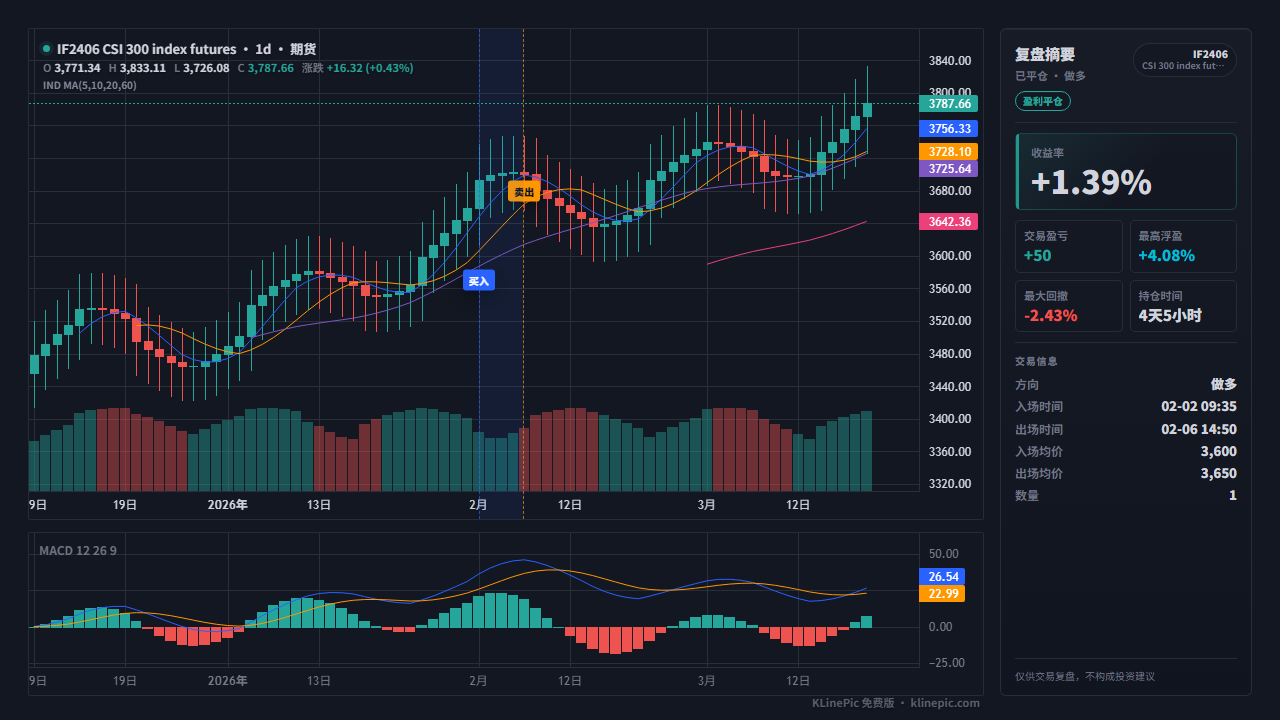
This guide covers both sides of the futures market: China domestic contracts (rb2510, IF2406, sc, au) with buy-open/sell-close (买开/卖平/卖开/买平) statement rows, and global month-letter contracts (ES, NQ, CL). KLinePic maps those fills into a K-line review chart with long/short direction, entry/exit (B/S) markers, holding window, return, max run-up, and max drawdown.
Free to start, no account needed to render — a statement becomes shareable review images in minutes, optional indicator panels such as MACD included.
China domestic futures. The authoritative record of your fills is the trade settlement statement (交易结算单). Guosen Futures' statement explainer lists two channels: the statutory one — logging in to the CFMMC investor query service (中国期货市场监控中心, cfmmc.com → 投资者查询) — and your broker's trading terminal. Per broker FAQ pages, your futures company issues the login credentials, and only a recent window stays retrievable online — archive the days you plan to review. The China Futures Association's explainer breaks the statement into five blocks — client information, funds, cash flows, trade summary, position summary — with detailed trade records opening from the trade summary.
Global futures brokers. For ES, NQ, CL, and other international contracts, export the fill-level report from your broker's portal — usually named an activity statement or trade report. Use whichever export lists each execution's contract code, side, fill time, fill price, and contract count; fills beat order history, which records intent, not what happened. Note any time-zone choice in the download dialog — it goes into the time column.
These statements share no official column dictionary, so the mapping below uses typical statement columns, not guaranteed header names.
The target schema is fixed: KLinePic reads trade_id, symbol, event_type, position_side, time, price, quantity, fee, note, documented in the data protocol. The parser is strict — any column outside that list is rejected — so extras such as the fee currency go inside note as free text (for example fee_asset=CNY).
| KLinePic field | Typical statement / export column | Notes |
|---|---|---|
| trade_id | Usually none — create your own | One stable id per round trip; open and close fills share it. |
| symbol | Contract code (合约代码) | rb2510, IF2406, ESZ4… spell it exactly as your K-line data does. |
| event_type | Direction (买卖 / Buy–Sell) | Lowercase buy or sell: 买开 and 买平 are buys, 卖开 and 卖平 are sells. |
| position_side | Direction + offset flag (开平) | long for 买开…卖平, short for 卖开…买平; required when an account holds both sides. |
| time | Trade date + time (成交日期/成交时间) | ISO-8601 with an explicit offset; Chinese statements print Beijing time — append +08:00. |
| price | Average fill price (成交均价) | The executed average, not the order price, in the same unit as the K-line data. |
| quantity | Lots (手数) or contract count | Lots/contracts as-is — never multiplied into notional by the contract multiplier. |
| fee | Commission (手续费) | Optional; close-today and close-yesterday fees may differ, both stay plain fees. |
| note | Usually none — add if useful | Optional free text. There is no fee-currency column — keep it as note text like fee_asset=CNY for Chinese domestic statements, or your broker's billing currency otherwise. |
Keep only actual contract fills — margin transfers, settlement interest, and fee-only adjustments never become markers. A long IF2406 and a short RB2510 round trip after mapping:
trade_id,symbol,event_type,position_side,time,price,quantity,fee,note
FUT-IF2406-001,IF2406,buy,long,2026-06-01T09:35:00+08:00,3600,1,23.10,fee_asset=CNY
FUT-IF2406-001,IF2406,sell,long,2026-06-05T14:50:00+08:00,3650,1,23.10,fee_asset=CNY
FUT-RB2510-002,RB2510,sell,short,2026-06-02T21:05:00+08:00,3185,3,9.30,fee_asset=CNY
FUT-RB2510-002,RB2510,buy,short,2026-06-04T10:30:00+08:00,3120,3,9.30,fee_asset=CNY
The futures template shows the pre-mapping, statement-style layout (成交日期, 成交时间, 合约代码, 买卖, 手数, 成交均价, 手续费). Chinese domestic contracts also need a K-line CSV uploaded with the trades — see the market data coverage guide; shared statement rules live in the broker statement trade review guide.
| KLinePic | Manual screenshot + spreadsheet | Typical trading-journal SaaS | |
|---|---|---|---|
| Setup time | Minutes — download, map, paste | Slow, repeated by hand per trade | Onboarding plus import setup |
| Account required | No account needed to render | None | Usually requires sign-up first |
| Output | Annotated K-line image with trade metrics | Static screenshot plus separate numbers | Web dashboards and statistics |
| Buy/sell markers on real K-line | Yes, B/S at actual fill price and time | Drawn manually, easy to misplace | Varies by product and plan |
| Shareable image | Yes — the chart is the deliverable | Screenshots without computed context | Often screenshots of dashboards |
| Cost to start | Free to start | Free, but pays in time | Commonly subscription-based |
Statements group night-session fills under the next trading day, so a Friday-night fill can carry Monday's date. Chart the printed clock time.
Chinese statements print Beijing time with no offset — write +08:00 into time. Global exports may use exchange time or your profile's zone; encode it explicitly.
买平 is a buy that closes a short, not a new long entry. Put the literal side in event_type and the round trip's side in position_side, or every close double-counts as an entry.
quantity is the lot or contract count straight from the statement. Multiplying by the contract multiplier turns 3 lots into a six-figure quantity.
rb2510 vs RB2510, or ESZ4 vs a continuous alias: the symbol must match your K-line data's spelling exactly, or candles cannot be found.
Yes. Keep trade date, trade time, contract code, direction (buy-open 买开, sell-close 卖平, sell-open 卖开, buy-close 买平), lots, and average fill price. KLinePic folds open and close fills of the same contract into one review trade with long or short direction and marks entry and exit on the chart.
Global month-letter contracts such as ES, NQ, and CL can use Yahoo Finance candles automatically. Chinese domestic contracts such as rb2510 or IF2406 use a custom K-line CSV that you upload alongside the trades, following the documented candle schema.
No. KLinePic is free to start and renders from a pasted or uploaded CSV without an account. Watermark-free high-resolution export is a paid option.
Every fill keeps its literal direction in event_type — 买平 is a buy, 卖平 is a sell — while position_side records the round trip's side: long for 买开 then 卖平, short for 卖开 then 买平.
Use the fill's clock time with an explicit offset. Chinese futures statements print Beijing time, so write +08:00. If a marker lands one day off, the statement's trading-day grouping of night-session fills is the usual cause.
Rows sharing one trade_id fold into one review trade. An entry filled in three slices and an exit in two stays five rows under the same id, shown as multiple markers on one chart.
Yes. Batch rendering is supported in the web UI, and the documented Agent API with its CSV/JSON data protocol can automate statement-to-image runs.