中文
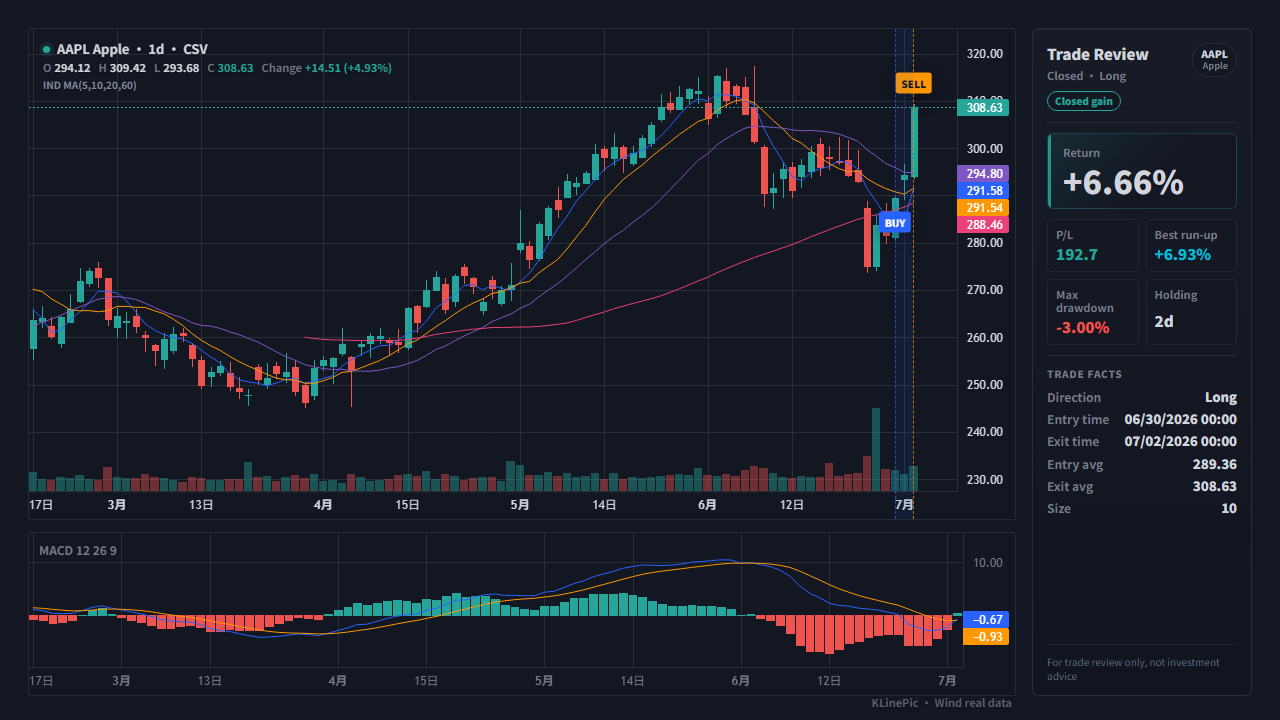
交易复盘图、交易日记K线图、买卖点标注图、股票交易复盘图、交割单复盘图、券商交割单生成K线图、成交记录复盘图。
Multilingual trade review workflow
Traders search for the same thing in different languages: a way to see their own entries and exits on a real price chart. This guide maps English, Chinese, Japanese, and Korean trade-review terms to one concrete workflow — export your trade history, normalize a few fields, and let KLinePic render a shareable K-line review chart with B/S markers, holding window, return, max run-up, max drawdown, and optional indicator panels such as MACD. It is free to start, and no account is required to render a chart.
交易复盘图、交易日记K线图、买卖点标注图、股票交易复盘图、交割单复盘图、券商交割单生成K线图、成交记录复盘图。
trade review chart, trading journal chart, trade recap chart, entry exit chart, buy sell marker chart, broker statement chart, contract note trade review.
トレード日記、取引履歴チャート、約定履歴チャート、売買ポイントチャート、取引レビュー、売買記録チャート。
거래 복기 차트, 매매일지 차트, 거래내역 차트, 체결내역 차트, 주식 거래 복기, 매수 매도 표시 차트.
| Search wording | Typical source file | Chart output |
|---|---|---|
| 交易复盘图 / trade review chart | Manual CSV, trading journal export, backtest fills | K-line chart with buy/sell markers and review panel |
| 交割单 / broker statement / contract note | Broker statement, trade confirmation, A-share 成交流水 | Executed trades mapped to entry and exit markers |
| 取引履歴 / 約定履歴 / 체결내역 | Japanese or Korean exchange/broker execution history | Normalized symbol, side, time, price, and quantity rows |
| OKX / Bybit / HTX / Binance trade history | Crypto exchange order, trade, or position exports | Crypto K-line review image with exchange-specific mapping |
Every platform names its export differently — trade history, execution history, 成交明细, 約定履歴, 체결내역 — but the export almost always lives near your order history or account statements. Menu paths vary by platform, app version, and interface language, so treat the patterns below as a starting point rather than exact steps, and check your platform's own help center for the current path.
On Binance, OKX, Bybit, Bitget, Gate, MEXC, KuCoin, and HTX, look under the orders or trade history area for an export or download option. Spot and futures fills usually export separately, and many exchanges limit one export to a fixed date range. See the crypto exchange guide for per-exchange notes.
Most US brokers offer a CSV download from an activity, history, or transactions page. Filter to trades only, since dividends and transfers appear in the same statement. The broker CSV guide walks through the generic mapping.
A-share traders typically pull a 交割单 or 对账单 from the broker's PC client or app, choosing a date range that covers the full trade. The A-share guide covers statement quirks in Chinese.
Look for 約定履歴 / 取引履歴 pages on Japanese platforms and 체결내역 / 거래내역 pages on Korean ones; many offer CSV downloads from the web or PC trading tool. If no export exists, copy the execution rows into a spreadsheet and normalize from there.
MetaTrader 4/5 can save the account history as a report from the terminal's history tab, which you can convert to CSV. The MetaTrader guide shows the mapping for forex and CFD fills.
Whatever the language of your export, the mapping targets are always the same nine fields. This table describes the typical columns of a generic export — your platform's exact column names will differ, so match by meaning, not by name.
| KLinePic field | Typical column in your export | Notes |
|---|---|---|
| trade_id | Often none — use an order ID or your own label | Give every fill of one round trip the same trade_id so partial entries and exits render on one chart. |
| symbol | Symbol, pair, ticker, 代码, 銘柄, 종목 | Keep one consistent format per market, e.g. BTCUSDT for crypto pairs or AAPL for US stocks. |
| event_type | Side or direction column | Normalize 买入 / 卖出, 買付 / 売付, 매수 / 매도, BUY / SELL into buy or sell. |
| position_side | Futures position direction, if present | Set long or short for futures; required when hedge mode holds both directions on one symbol. Optional for spot and stocks. |
| time | Trade, fill, or execution time | Include the date and an explicit timezone offset; exports may use local, exchange, or UTC time. |
| price | Fill or execution price | Per-unit price, not the total amount of the fill. |
| quantity | Filled quantity | Base units — coins, shares, lots, or contracts — not the quote-currency value. |
| fee | Fee or commission column | Optional; useful for accurate journal records. |
| note | Fee currency, exchange name, or remark column | Optional free text. KLinePic has no fee_asset or currency column — keep those details as note text, e.g. fee_asset=USDT or exchange=OKX, or drop them. |
A multilingual trade review chart should not depend on the source language. Normalize the record into the stable KLinePic fields first:
trade_id,symbol,event_type,position_side,time,price,quantity,fee,note
JOURNAL-AAPL-001,AAPL,buy,long,2026-06-10T09:45:00-04:00,192.30,20,1.00,fee_asset=USD
JOURNAL-AAPL-001,AAPL,sell,long,2026-06-12T14:30:00-04:00,198.10,20,1.00,fee_asset=USD
Keep the original notes and language-specific wording in your own journal if they help later review, but make the chart engine read stable fields rather than language-specific column names. Ready-made starting points: the broker trades template, the crypto exchange template, and the A-share statement template.
| KLinePic | Manual screenshot + spreadsheet | Typical trading-journal SaaS | |
|---|---|---|---|
| Setup time | Minutes: paste or upload fills | Slow: capture, crop, and annotate each chart by hand | Account setup plus per-broker import configuration |
| Account required | No account needed to render a chart | None | Usually requires sign-up |
| Output | Annotated K-line review chart image | Static screenshot plus separate spreadsheet stats | Dashboards and aggregate statistics |
| Buy/sell markers on a real K-line | Yes, placed from your actual fills | Drawn by hand, easy to misplace | Varies by product |
| Shareable image | Yes, designed as the primary output | Yes, but assembled manually each time | Often screenshots of a dashboard |
| Cost to start | Free to start; watermark-free high-res export is a paid option | Free, but costs time on every trade | Commonly subscription-based |
Common terms include trade review chart, trading journal chart, 交易复盘图, 交割单复盘图, broker statement chart, contract note trade review, トレード日記, 取引履歴チャート, 거래 복기 차트, 매매일지 차트, and 체결내역 차트.
Normalize every language or platform export into the same stable fields: trade_id, symbol, event_type, position_side, time, price, quantity, fee, and note. There is no separate fee-currency column — keep details like fee_asset=USDT inside note as free text. KLinePic then renders entry and exit markers, holding window, return, max run-up, and max drawdown.
They are different source documents but can feed the same review-chart workflow. Broker statements, contract notes, 交割单, 取引履歴, and 체결내역 usually provide executed trades; trading journals add user notes and strategy context.
No. Column headers can stay in any language because you map values, not headers, into the KLinePic fields. The main values that need normalizing are side words: convert terms like 买入 / 卖出, 買付 / 売付, or 매수 / 매도 into buy or sell in the event_type column.
The normalization workflow is language-independent, so 約定履歴 or 체결내역 exports can be mapped the same way. Whether a specific symbol can be charted depends on market-data coverage, so check the market data coverage guide for your instrument before building a large batch.
KLinePic is free to start, and no account is required to render a trade review chart. Watermark-free high-resolution export is a paid option.
Yes. Batch rendering is supported, and the documented Agent API guide plus the CSV/JSON data protocol describe the same fields used on this page, so scripts and agents in any language can render review charts automatically.