Time zone drift
Bybit says statement date ranges follow UTC+0; verify a known trade, then encode the zone as an explicit offset in time.
Bybit trade history chart
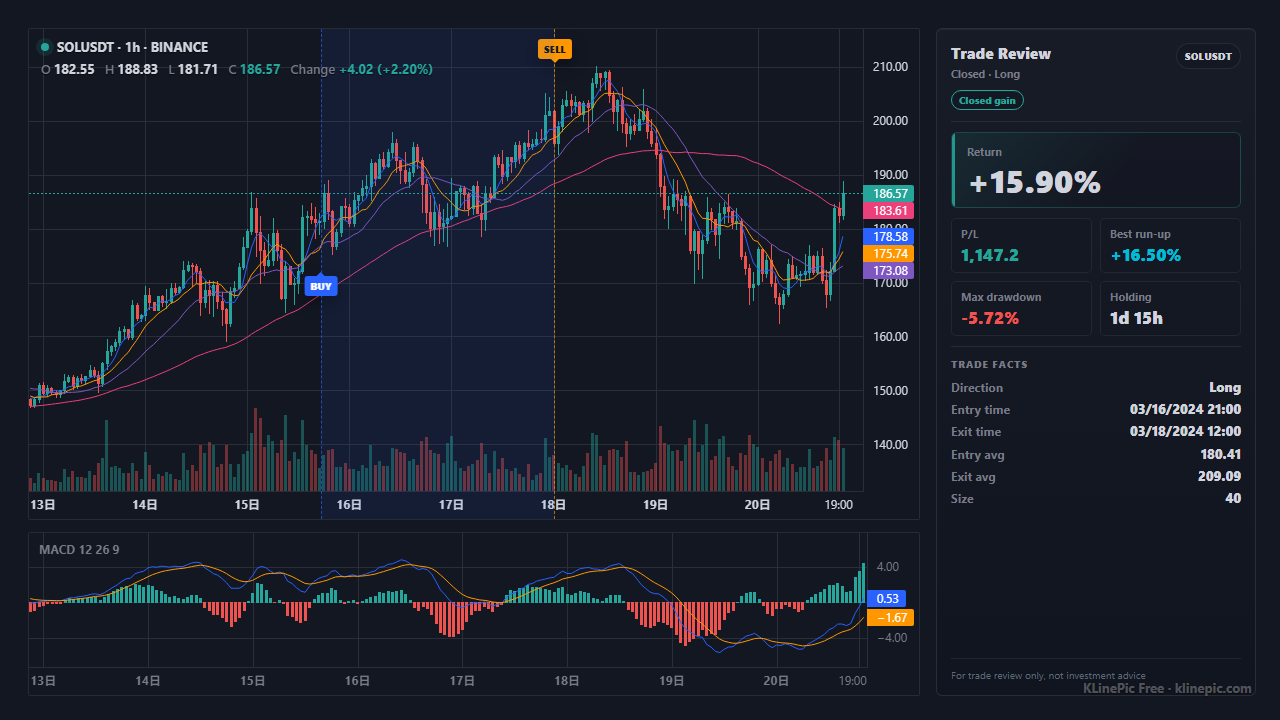
Written for Bybit spot, perpetual, futures, and options traders who want real executions on the chart, not in a spreadsheet. Export Order History from Bybit, map the execution rows into KLinePic's CSV schema, and render a shareable review image with entry/exit (B/S) markers, holding window, return, max run-up, max drawdown, and optional indicators such as MACD.
KLinePic is free to start and needs no account to render, so the export-to-image loop takes minutes.
Bybit documents the export in its help center article How to Self-Export My Account Data. Of the three data types — Account Statement (PDF), Transaction Log (CSV), and Order History (CSV) — a review chart needs Order History: trading directions, quantities, fees, and entry and filled prices. The flow:
For recent trades, a faster documented path is Orders > Unified Trading Order > Export on the product history tab: six months of records within the last two years, 10,000 entries per file, ten daily export requests for spot and five for derivatives.
Bybit documents the export flow and limits but not exact CSV column headers, which vary by record type — treat this table as a checklist against your file's typical columns. The target schema is the ten KLinePic fields, documented in the data protocol. The parser is strict: any column outside these ten is rejected, so fold extras into note instead of inventing new headers.
| KLinePic field | Your export's typical column | Notes |
|---|---|---|
| trade_id | Usually none — create your own | One stable id per round-trip trade; entry and exit fills share it. |
| symbol | Contract / trading pair column | Keep the plain pair such as ETHUSDT; strip any derivatives suffix. |
| event_type | Side / direction column | Normalize to lowercase buy or sell. |
| position_side | Derivatives direction column, if present | Spot can default to long. Derivatives need explicit long / short. |
| time | Fill / execution time column | Confirm UTC vs local display time, then write explicit offsets like +00:00. |
| price | Filled / executed price column | Use the executed price, not the order's limit price. |
| quantity | Executed quantity in the base asset | Base units (ETH), not the USDT value; convert contract counts to base. |
| name | Usually none — optional | Optional display name for the trade, shown on the chart. |
| fee | Fee amount column | Optional; useful for net-return journaling. |
| note | Fee currency and other extra columns | Optional free text. Extra columns such as fee_asset or exchange are ignored on import and listed back to you; keep them as note text like exchange=Bybit fee_asset=USDT only when you want them preserved. |
A complete Bybit round-trip — one buy, one sell, same trade_id:
trade_id,symbol,event_type,position_side,time,price,quantity,fee,note
BYBIT-ETH-001,ETHUSDT,buy,long,2026-06-04T02:30:00+00:00,3520.4,1.5,0.0015,exchange=Bybit fee_asset=ETH
BYBIT-ETH-001,ETHUSDT,sell,long,2026-06-04T11:10:00+00:00,3618.9,1.5,5.43,exchange=Bybit fee_asset=USDT
The exchange name and fee currency can ride inside note as free text when you want them preserved. Separate exchange or fee_asset columns are ignored on import and listed back to you. Scaling in or out adds rows with the same id; the crypto exchange template ships this exact header.
| KLinePic | Manual screenshot + spreadsheet | Typical trading-journal SaaS | |
|---|---|---|---|
| Setup time | Minutes: export, map, paste | Slow, repeated per trade | Sign-up and import setup |
| Account required | No account needed to render | None | Usually sign-up first |
| Output | Annotated K-line image with trade metrics | Static screenshot plus separate numbers | Web dashboards and statistics |
| Buy/sell markers on real K-line | Yes, B/S at fill price and time | Drawn manually, easy to misplace | Varies by product and plan |
| Shareable image | Yes — the chart is the deliverable | Screenshots without computed context | Often screenshots of dashboards |
| Cost to start | Free to start | Free, but pays in time | Subscription-based |
Bybit says statement date ranges follow UTC+0; verify a known trade, then encode the zone as an explicit offset in time.
Order records show what you asked for. Markers need trade rows with executed price and quantity.
One order can fill in several rows. Keep them under one trade_id; otherwise a single scale-in reads as five unrelated trades.
quantity is the base amount (1.5 ETH), not a contract count or the USDT value — convert derivatives sizes first.
Accounts can hold long and short on the same symbol; without explicit long/short, a closing buy looks like an opening buy.
Closed P&L records summarize a position — fine for accounting, but markers need individual executions. Map fills, not aggregates.
Export Order History from Bybit's Data Export page, map the execution rows into KLinePic's CSV fields, and upload or paste the CSV to render an annotated K-line review chart. No account is needed to render.
Use execution-level trade rows: fill time, executed price, executed quantity. Bybit's Order History data type ships as CSV and covers spot, derivatives, and options; the Account Statement is a PDF for audit, not chart markers.
Hover over your Profile on the Bybit website, then open Account > Data Export and choose Order History. For recent trades, use Export under Orders > Unified Trading Order. Exports are not available in the Bybit app.
Each Data Export file covers at most 12 months, up to 50 exports per month; export longer histories in yearly slices. Quick exports under Unified Trading Order cover six months within the last two years, capped at 10,000 entries.
Bybit says statement date ranges follow UTC+0 but does not document every CSV timestamp column. Verify a known trade, then write times with an explicit offset such as 2026-06-04T02:30:00+00:00.
No. The CSV export is enough; KLinePic renders from an uploaded or pasted file. For automation, there is a documented Agent API and CSV/JSON data protocol.
Fill position_side with long or short for every derivatives fill; without it a closing buy looks identical to an opening buy.
Yes. Batch rendering can turn a month of Bybit trades into a full set of review images in one pass, via the web UI or the documented Agent API.