Charting orders instead of fills
The order-history file includes canceled and unexecuted orders. If a marker sits where the market never traded, you mapped an order row; keep fills only.
HTX Huobi trade history chart
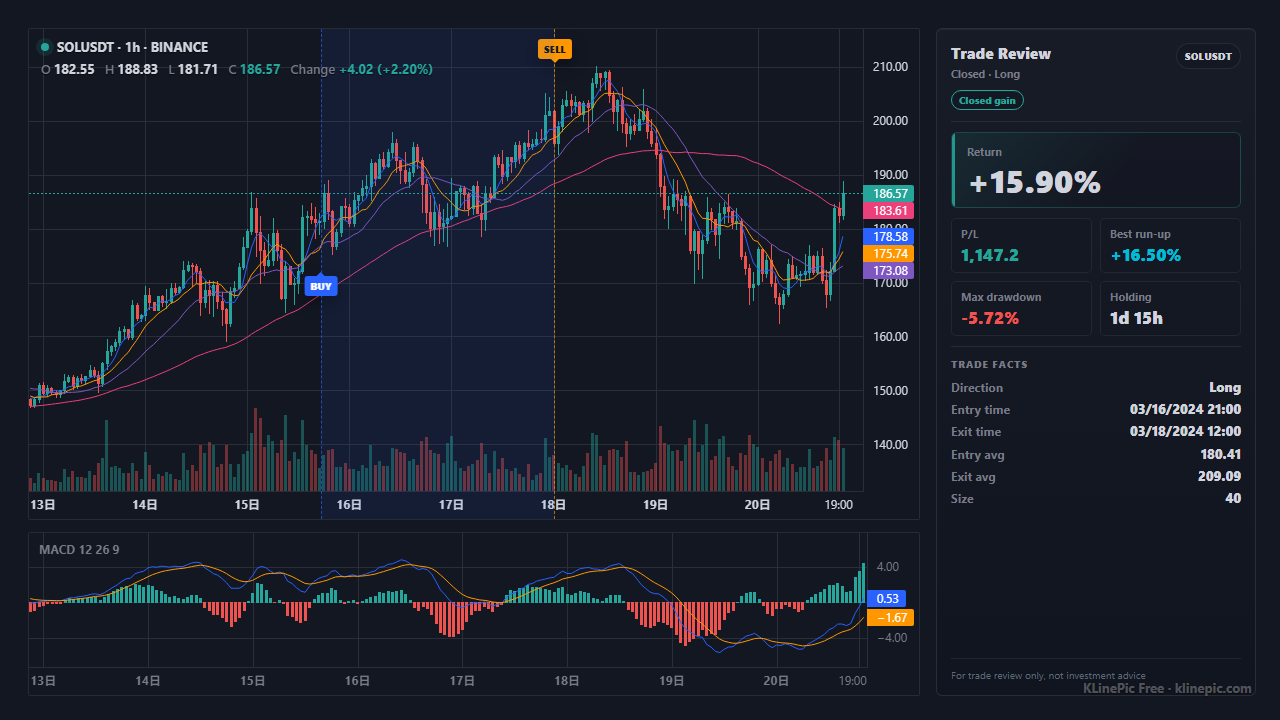
This guide is for HTX traders — including anyone holding legacy Huobi files — who want each trade drawn back onto the actual candles. Export your history, map the rows to a small standard CSV, and KLinePic renders an annotated K-line review chart with entry/exit markers, holding window, return, max run-up, and max drawdown.
First, the naming: HTX announced on September 13, 2023 that Huobi would be rebranded as HTX (official rebrand announcement). Your account and download flow are unchanged, whichever name your old files carry.
Futures (USDT-M and Coin-M). HTX's official help page, How to Download My Order History for USDT-M and Coin-M Futures Orders, describes the flow: open Trade Management → Order History in the contract trading interface, pick the contract type and period, then click the document icon to download the .xls order record. Two details matter for charting: the list mixes canceled, executed, and unexecuted orders, and the download service covers orders within 3 months — export on a schedule for a longer archive.
Futures account records. HTX's Guide to Querying Futures Data adds a second source: Assets → My Assets → Futures Account holds transaction records and PnL analysis, and several futures data sets can be exported.
Spot and margin. Spot history lives in the Orders area of the web app, in separate order-history and trade-history views. The official pages we verified detail the futures flow; spot screens change over time, so find the export control on your history screen and confirm what your file contains before mapping.
HTX does not publish an export column dictionary in the pages cited above, so the mapping below goes by meaning rather than exact header names.
| Your export's typical column | KLinePic field | Notes |
|---|---|---|
| Order or trade ID column | trade_id |
Use one ID per round trip so the entry and exit pair up; any unique string works. |
| Symbol / trading pair column | symbol |
Flatten to one convention such as SOLUSDT; futures files may use contract-style codes. |
| Side or direction column | event_type |
Reduce each fill to buy or sell. Opening a long or closing a short is a buy; closing a long or opening a short is a sell. |
| Long/short column (futures) | position_side |
long or short; essential for hedged positions on the same contract. |
| Time / filled-at column | time |
Convert to ISO 8601 with an explicit offset after confirming the export's timezone. |
| Price / average price column | price |
Use the executed fill price, not the limit price of an order that never filled. |
| Amount / filled quantity column | quantity |
Base-asset units (coins or contracts), never the quote-currency total. |
| Fee column | fee |
Optional, but it keeps the net return honest. |
| Fee currency column | note |
KLinePic has no fee-currency column — a header like fee_asset is rejected. Keep it as note text such as fee_asset=USDT, or drop it. |
Two rows — a buy and a sell sharing one trade_id — render a complete round trip. The parser accepts only the standard columns, so exchange name and fee currency ride along inside note as free text:
trade_id,symbol,event_type,position_side,time,price,quantity,fee,note
HTX-SOL-001,SOLUSDT,buy,long,2026-06-05T07:20:00+00:00,145.3,20,0.02,exchange=HTX fee_asset=SOL
HTX-SOL-001,SOLUSDT,sell,long,2026-06-05T18:40:00+00:00,151.8,20,3.04,exchange=HTX fee_asset=USDT
The full workflow:
| KLinePic | Manual screenshot + spreadsheet | Typical trading-journal SaaS | |
|---|---|---|---|
| Setup time | Minutes — map once, paste or upload | Slow — find, crop, annotate each chart by hand | Signup plus import configuration |
| Account required | No account needed to render a chart | No account, all manual effort | Usually requires an account |
| Output | Annotated K-line review chart image per trade | Static screenshot plus a separate spreadsheet | Dashboards and statistics; chart images vary |
| Buy/sell markers on real K-line | Yes — B/S markers placed from your actual fills | Only if you draw them yourself | Varies by product and plan |
| Shareable image | Yes — built as a shareable review chart | Yes, but quality depends on manual effort | Often designed for in-app viewing |
| Cost to start | Free to start | Free, but pays in time per trade | Commonly subscription-based |
The order-history file includes canceled and unexecuted orders. If a marker sits where the market never traded, you mapped an order row; keep fills only.
Markers hours off the candles mean a timezone mismatch. Confirm the export's timezone, then write ISO 8601 times with an explicit offset.
Exports often show a coin amount and a USDT total. Quantity must be the base-asset amount; the quote total inflates size and breaks return math.
SOL/USDT, SOLUSDT, and futures contract codes can all appear across HTX products. Flatten to one convention so each trade resolves to the right K-line.
Hedged long and short fills on the same contract cannot pair correctly without position_side. Carry the direction column through on every futures row.
One order can execute as several fills. Keep them as separate rows under one trade_id so the chart shows the whole round trip, not fragments.
Yes. Huobi announced its rebrand to HTX on September 13, 2023. Older files may still carry the Huobi name, but the account, order history, and export flow are the same platform.
Download your history, keep only executed fills, and map the rows to trade_id, symbol, event_type, position_side, time, price, quantity, and fee, keeping extras such as the fee currency inside note. Paste or upload the result and KLinePic renders an annotated K-line review chart with buy and sell markers.
HTX's official futures help states the download service covers orders within 3 months, so export regularly and archive the files if you want older trades on hand.
HTX's futures help describes .xls order records. KLinePic reads CSV or pasted rows, so open the file in a spreadsheet, keep the executed fills, and re-save the mapped columns as CSV.
No. KLinePic works from the exported file or pasted rows, so you never share API keys or credentials. Rendering a review chart is free to start, no account required; watermark-free high-resolution export is a paid option.
Yes. Keep each position's direction in position_side (long or short) and mark each fill as buy or sell in event_type; markers then pair correctly for long and short round trips.
Almost always a timezone mismatch. Confirm which timezone your export uses, then write ISO 8601 times with an explicit offset (for example 2026-06-05T07:20:00+00:00) so each fill lands on the right candle.